As an Amazon Associate I earn from qualifying purchases.
The laptop desk setup essentials are a laptop stand, a separate mouse and keyboard, and a USB-C hub. The stand lifts the screen toward eye level, the external mouse and keyboard keep your hands at elbow height, and the hub connects everything with one cable. Add a desk pad, power strip and cable clips to finish it.
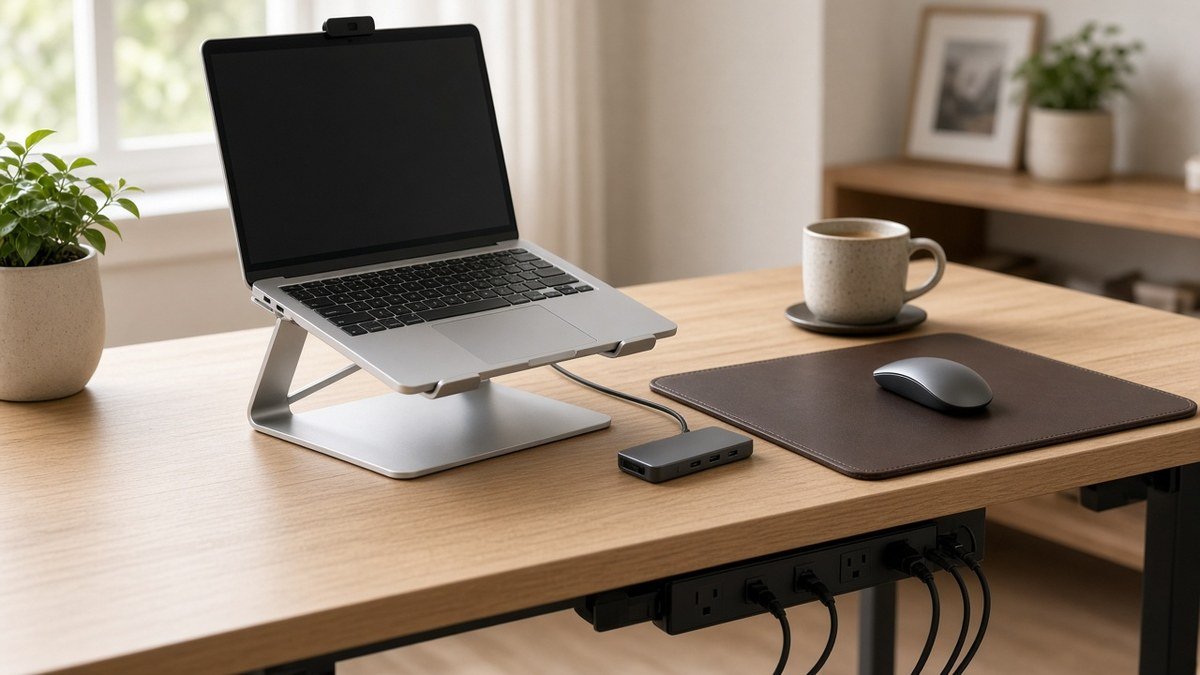
Below are ten picks, each matched to the problem it fixes, with links to check today’s price on Amazon.
Quick Picks: Laptop Desk Setup Essentials at a Glance
| Product | Best for | Problem it fixes | Amazon |
|---|---|---|---|
| BESIGN LS03 Aluminum Laptop Stand | Best fixed-height laptop stand | Neck strain from looking down | Check Price |
| Nulaxy Pull-Out Height Adjustable Laptop Stand | Best adjustable laptop stand | Screen height that changes by task | Check Price |
| Logitech G305 Lightspeed Wireless Mouse | Best wireless mouse for long workdays | Cramped trackpad use | Check Price |
| Anker 5-in-1 USB-C Hub with 4K HDMI | Best compact USB-C hub for one monitor | Too few ports | Check Price |
| Hiearcool 7-in-1 USB-C Hub | Best hub with SD card readers | Ports plus photo cards | Check Price |
| Aothia Leather Desk Pad | Best desk pad and mouse surface | Scratched desk, slippy mouse | Check Price |
| HANYCONY Surge Protector Power Strip | Best power strip for a desk | Not enough outlets | Check Price |
| Desk Cord Organizer Cable Clips (2-Pack) | Best cheap cable fix | Cables falling behind the desk | Check Price |
| Mind Reader Adjustable Foot Rest | Best for short users or tall chairs | Dangling feet, poor posture | Check Price |
| Logitech Brio 101 1080p Webcam | Best webcam upgrade for calls | Closed laptop or weak built-in camera | Check Price |
Our Top Picks at a Glance
BESIGN LS03 Aluminum Laptop Stand
Nulaxy Pull-Out Height Adjustable Laptop Stand
Logitech G305 Lightspeed Wireless Mouse
As an Amazon Associate I earn from qualifying purchases. Prices and availability change often; check Amazon for today’s price.
Why a Laptop Needs a Desk Setup in the First Place
A laptop’s screen and keyboard are attached. When the keyboard is comfortable, the screen is too low, and vice versa.
Ergonomics guides and Reddit threads from remote workers with sore necks agree: split the screen from the keyboard. Raise the laptop so the top of the screen is at or slightly below eye level, and type on an external keyboard and mouse at about elbow height.
What to Buy First (If You’re on a Budget)
- A laptop stand to raise the screen.
- An external mouse and keyboard (any comfortable keyboard works).
- A USB-C hub if you want a monitor or several accessories plugged in at once.
- Comfort and tidy-up extras such as a desk pad, power strip, cable clips and a foot rest.
1. BESIGN LS03 Aluminum Laptop Stand: Best fixed-height laptop stand
The BESIGN LS03 Aluminum Laptop Stand is the simplest way to stop looking down at your screen. It is an aluminum stand that fits most 10 to 15.6 inch laptops, including MacBook Air and Pro, Dell, HP, Lenovo and Chromebook models.
According to the listing, it raises the laptop by up to about 5.7 inches (14.5 cm) and holds up to 8.8 lbs. Rubber grips stop the laptop from sliding, and the open design lets air flow underneath. It comes apart for travel.
- Pros: sturdy metal build; open design helps airflow; detachable for travel; carries an Amazon’s Choice badge
- Cons: height is not adjustable, so very tall users may want more lift; not made for laptops over 15.6 inches
Best for: anyone who wants one simple, fixed stand for a single desk.
2. Nulaxy Pull-Out Height Adjustable Laptop Stand: Best adjustable laptop stand
If you need more control, the Nulaxy Pull-Out Height Adjustable Laptop Stand is a height-adjustable stand. The product listing describes it as a pull-out design rated to support up to 22 lbs.
- Pros: adjustable height and angle; helps airflow; strong support rating
- Cons: bulkier than flat or fixed stands; still needs an external keyboard and mouse for the full benefit
Best for: tall users, shared desks and anyone who wants to fine-tune screen height.
3. Logitech G305 Lightspeed Wireless Mouse: Best wireless mouse for long workdays
With the laptop on a stand, the trackpad is out of reach. The Logitech G305 Lightspeed Wireless Mouse is a light wireless mouse popular with gamers and remote workers.
The listing title highlights Logitech’s Hero sensor, a 1 ms Lightspeed wireless connection, up to 250 hours of use on one AA battery, six programmable buttons and a weight of 99 g with the battery.
- Pros: light and responsive; very long battery life on a single AA; programmable buttons for shortcuts
- Cons: uses a USB receiver, so you may need an adapter or hub on USB-C-only laptops; small size may not suit large hands
Tip: plug the receiver into a USB-A port on your hub. The mouse stores the receiver inside when you travel.
4. Anker 5-in-1 USB-C Hub with 4K HDMI: Best compact USB-C hub for one monitor
Thin laptops often have just one or two USB-C ports. The Anker 5-in-1 USB-C Hub with 4K HDMI turns one of them into an HDMI port, three data ports and a charging pass-through.
According to the listing, HDMI output goes up to 4K at 30Hz, the USB-C and two USB-A data ports run at up to 5 Gbps, and the PD-IN port passes through up to 85W of charging (charger not included). It works with USB-C, USB4 and Thunderbolt laptops on macOS 12+, Windows 10/11 and ChromeOS.
- Pros: small enough to travel with; keeps the laptop charging while everything is plugged in; well-known charging brand
- Cons: 4K at 30Hz is not ideal for high-refresh monitors; no Ethernet or SD card slot; Linux not supported
Best for: a simple one-monitor setup with a keyboard, mouse and charger. If you travel with your hub, our travel tech pouch essentials guide shows how to pack it with your chargers and cables.
5. Hiearcool 7-in-1 USB-C Hub: Best hub with SD card readers
The Hiearcool 7-in-1 USB-C Hub is a 7-in-1 hub for people who also need card slots. The product title lists 4K HDMI, 100W power delivery, USB 3.0 ports at 5 Gbps and SD/TF card readers.
- Pros: more ports in one hub; SD and microSD readers built in; compact
- Cons: hubs can get warm; not a full docking station
Tip: check your laptop’s spec page to confirm its USB-C port supports video output before buying any hub.
6. Aothia Leather Desk Pad: Best desk pad and mouse surface
The Aothia Leather Desk Pad is a 23.6 x 13.7 inch PU leather mat big enough to sit under a laptop stand, keyboard and mouse at once.
The listing says the surface resists scratches, spills and heat, wipes clean with a damp cloth, and has a non-slip underside. Our product page notes it has ranked as the #1 Best Seller in Amazon’s Mouse Pads category.
- Pros: replaces a separate mouse pad; protects rented or wood desks; easy to wipe clean
- Cons: may be too small for two monitors and a wide keyboard; a new pad may need a few days to lie flat
7. HANYCONY Surge Protector Power Strip: Best power strip for a desk
A laptop, monitor, lamp and phone charger add up fast. The HANYCONY Surge Protector Power Strip gives you 8 AC outlets spaced 2.2 inches apart, plus 2 USB-C and 2 USB-A ports.
According to the listing, it has surge protection rated at a minimum of 1080 joules, a built-in circuit breaker, a flat right-angle plug, a 5 ft braided cord and mounting holes for the wall or under a desk. It is ETL certified.
- Pros: lots of outlets plus USB-C; wide spacing fits bulky laptop bricks; flat plug fits behind furniture
- Cons: USB ports share their output, so they are not a fast laptop charger; 5 ft cord may be short in big rooms
8. Desk Cord Organizer Cable Clips (2-Pack): Best cheap cable fix
The cheapest fix on this list is the Desk Cord Organizer Cable Clips (2-Pack). These adhesive clips stick to the edge of your desk and hold charging cables in place so they don’t fall behind it every time you unplug.
- Pros: very affordable; instant tidy-up; keeps chargers within reach
- Cons: adhesive may not stick to every surface; hard to move once placed
Tip: clean the spot with rubbing alcohol first so the adhesive holds better.
9. Mind Reader Adjustable Foot Rest: Best for short users or tall chairs
When you raise your chair to match a desk, your feet may stop resting flat on the floor. The Mind Reader Adjustable Foot Rest fixes that. The listing gives its size as 17 x 13 x 6.25 inches, and the height is adjustable.
- Pros: simple, affordable posture help; adjustable height; works under any fixed-height desk
- Cons: plastic build feels less premium; bulky to move around
Tip: sit back in your chair and adjust it until your knees are at about hip height.
10. Logitech Brio 101 1080p Webcam: Best webcam upgrade for calls
If you close your laptop and work on a monitor, its camera is out of action. The Logitech Brio 101 1080p Webcam is a Full HD 1080p webcam with auto-light correction, a built-in mic and a privacy shutter. It connects over USB-A and works with Teams, Google Meet and Zoom, according to the listing.
- Pros: plug-and-play; sharper than many laptop cameras; privacy shutter built in
- Cons: built-in mic is basic; not meant for advanced streaming; needs a USB-A port or adapter
For lighting, framing and audio tips, see our video call setup for remote work guide. If you keep using your laptop’s own camera, a slim CloudValley webcam cover slide is a cheap privacy add-on, but check your laptop maker’s guidance first.
How to Choose Your Laptop Desk Setup Essentials
Start with how long you sit at the desk and what you plug in each day.
How many hours a day do you work on the laptop?
For an hour now and then, the laptop alone is fine. For most of a workday, get a stand plus an external keyboard and mouse. At the same desk every day, a monitor connected through a hub is the most comfortable option.
Fixed or adjustable laptop stand?
A fixed stand like the BESIGN is sturdy and simple. An adjustable stand like the Nulaxy is better if you are tall, share the desk or move between tasks.
Check your laptop’s ports before buying a hub
Not every USB-C port carries video or accepts charging, so check your exact laptop model. Then count what you need: monitors, USB-A devices, SD cards and charging wattage.
Do you work remotely or on the road?
If you also work from hotels or coworking spaces, choose pieces that pack small, like a detachable stand, a compact hub and a wireless mouse. Our remote work tech kit for digital nomads covers the bigger gear, like laptops and headphones.
Laptop Desk Setup FAQs
Is a laptop stand worth it?
Yes, if you work on a laptop for more than an hour or so at a time. Raising the screen toward eye level reduces how much you bend your neck. Just pair it with an external keyboard and mouse.
Do I need an external keyboard with a laptop stand?
Yes for long sessions. Once the laptop is raised, its keyboard is too high for your wrists and shoulders to stay relaxed.
How high should my laptop screen be?
Ergonomics guides commonly recommend the top of the screen at or slightly below eye level, at about an arm’s length away.
Can I use my laptop like a desktop computer?
Yes. Connect a monitor, keyboard, mouse and charger through a USB-C hub, then plug in one cable when you sit down. Check that your laptop’s USB-C port supports video first.
Conclusion: Build Your Laptop Desk Setup in Steps
The laptop desk setup essentials come down to three moves: raise the screen, separate the keyboard and mouse, and connect everything through one hub. Start with the BESIGN LS03 Aluminum Laptop Stand or Nulaxy Pull-Out Height Adjustable Laptop Stand, add the Logitech G305 Lightspeed Wireless Mouse, then the Anker 5-in-1 USB-C Hub with 4K HDMI when you’re ready for a monitor. Check today’s price on each product page before you buy.
Desk supplies from our shop
- Post-it Super Sticky Notes, 3×3, 24 Pads: sticky notes that hold on monitors and walls.
- SightPro Magnetic MacBook Pro 14″ Privacy Screen: a magnetic privacy screen for a 14-inch MacBook Pro.
- Scotch Magic Tape, 3 Dispenser Rolls: everyday tape in refillable dispensers.
Related: Running a small shop or side business from this desk? Compare the best POS for small business in 2026, from countertop registers to simple card readers.

Author: TrendRanker Editorial Team
The TrendRanker Editorial Team is the independent research group behind TrendRanker.online. We compare published product specifications side by side, analyze patterns in long-term verified owner reviews, and screen out products with signs of high return rates or early failures before anything is recommended. Our guides cover remote work and travel gear, everyday tech, personal care, and gifts for US shoppers. We are not paid by brands for placement, and every guide is written in our own words.